Your reports, goals and questions, in one place.
Open the dashboard and see your latest DEXA, VO2 Max and RMR side by side, each with its own date and report. Track a goal, compare two tests, add progress photos and ask the AI Assistant about your results. It works on desktop, tablet and phone.

Every screen has a job.
Each test keeps its own date, so a DEXA from September and a VO2 Max from August are never presented as one assessment.
Overview
Separate summaries for DEXA, VO2 Max and RMR, each with its own test date and a link to the report. What is going well, what to look at next, and a prompt to book when you are due. A first result is shown as your baseline, not as an improvement.
DEXA report
Overview, Regional and Bone views. Reported body composition measurements, reference information and a body map by region. Download the original PDF, with clinic booking links where available.
VO2 Max report
Peak oxygen uptake against predicted, ventilatory thresholds, Fat Max, training zones and the stage table, charted from your report's own numbers. Progression across tests once you have more than one.
RMR report
Measured resting energy against predicted, respiratory quotient, fuel mix and the variation in your test. Your measured number is a resting figure, not a daily calorie target, and the report says so.
Trends and compare
Overlay any metrics on one chart to see how they move together. Compare any two tests of the same type side by side, with changes shown as increased or decreased and a regional change view for DEXA.
Goals
Set a body composition or VO2 Max goal, with suggestions based on your latest results that you can edit. Progress shows how far you have moved from your starting measurement, separately from the time you have left.
AI Assistant
Ask the AI Assistant to explain your last report in plain language, point out what to focus on, or make sense of your fat and lean numbers. Past chats are kept in a history panel, and the AI Assistant only ever reads your own records.
Progress photos
Add a front photo, plus side and back if you want them, with a preview before you save. Each set opens with a large front view and the other angles underneath, and you can compare two sets side by side.
Records and profile
Every report in one list with its detail page and original PDF. Download a report to share, remove one you no longer want, manage consents, add a profile photo or close your account.
Progress you can see, separate from the clock.
A goal bar that only tracks the calendar tells you nothing about your body. MyBodyLab measures your starting point, your latest result and your target, and shows how far along you are whatever the date.
- Up to three suggestions drawn from your latest results, which you can accept, edit or ignore.
- You choose the date. There are no fixed timelines imposed on your goal.
- Body composition and VO2 Max goals. Resting energy is a measurement, not a target to improve.
- Completed goals are kept. They move to a Completed list, where you can delete one or set a new goal.

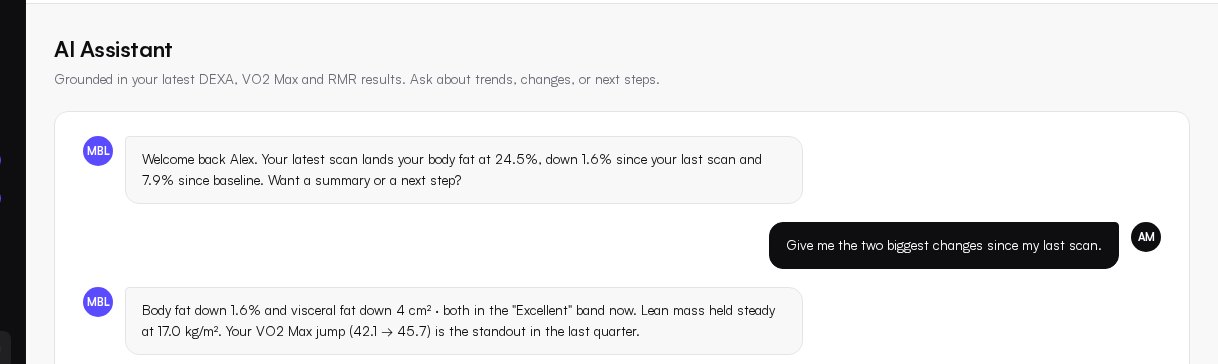
Ask about your own results, in plain language.
The AI Assistant reads your published DEXA, VO2 Max and RMR reports and your goals, then explains them. It is built to help you understand your numbers and prepare better questions, not to diagnose anything.
- Suggested questions that adapt to the reports you have and disappear once you start typing.
- Chat history. A panel on desktop and a History button on mobile, with each new chat starting fresh.
- Dates and age of results. The AI Assistant tells you when a result is more than six months old.
- Unusual results go to a clinician. The AI Assistant does not guess at a cause or prescribe intake, supplements or treatment.
- Separate permission. Using the AI Assistant needs its own consent, which you can switch off at any time while keeping your reports.
Upload your own reports, or have them filed for you.
If a clinic performed your test, the report can be filed straight to your account. If you already have PDFs, add them yourself.
Upload DEXA, VO2 Max and RMR
Add a supported PDF and it is read into your record with the original kept. VO2 Max and RMR reports are read on our systems without sending your PDF or its text to an outside AI or OCR service, and names, dates of birth and patient IDs are left out of the numbers we store.
Clear status, no silent failures
Uploads show progress and a real result. A duplicate is recognised, and if you previously removed that report the dashboard asks before adding it back, rather than failing with an error.
Your own uploads are labelled
Reports you upload yourself are marked as self-published. They are not presented as clinic-approved, and the original document is always one click away.
Consent and control are built into the dashboard.
Two separate permissions
Allowing a clinic to share your results into MyBodyLab is one choice. Allowing the AI Assistant to process your chats is another. Turning the AI Assistant off keeps your reports and past conversations, and withdrawing sharing pauses access without deleting your account.
Remove a report
Remove any DEXA, VO2 Max or RMR report from the dashboard. It leaves your views, trends, comparisons, goals and future AI Assistant answers, and its share links stop working. The original clinical record is kept privately as health record rules require.
Share with clear limits
Send downloaded PDFs or screenshots to your coach or doctor. DEXA PDF links, where available, expire and are revoked when platform consent is withdrawn or a report is removed. Copies already sent cannot be recalled.
Close your account
Closing removes your profile, photos and non-clinical data in a verified process. Clinical report archives are retained for the period the law requires, and we say so up front.
Details are on the security and privacy page.
Nothing breaks when you have one test.
Every screen has a clear state for no tests and for one test. You see what the report will look like, what to book next and why, not an empty chart.
- Metric explainers: what it is, why it matters and what your value means
- Missing measurements show as Not reported, never as a zero
- One scan shows a labelled illustration of what a second scan unlocks
- Book a test from the VO2 Max, RMR and DEXA screens when you are ready
- New accounts see a small New badge on VO2 Max and RMR, which disappears for good once you open each one
Web dashboard
Deep reports, comparisons, trends, goals, the AI Assistant and records. The place to sit down with your data, and it also works well on a phone browser.
iOS app
The existing MyBodyLab iOS app stays available while it is brought up to match the web dashboard. The web dashboard is where the newest features appear first.
App StoreBlood tests are on the way.
Blood panels with results against laboratory ranges, trends and plain-English guidance are being prepared for the dashboard. They are not part of the dashboard today. See the planned panels
Open the dashboard with your own data.
Use your invitation or ask our team for access, then add supported reports and see your record take shape.